
Sell Moo Ping Controls & HUD
Menus, redeem flow, grill actions, cleanup, and stall management.
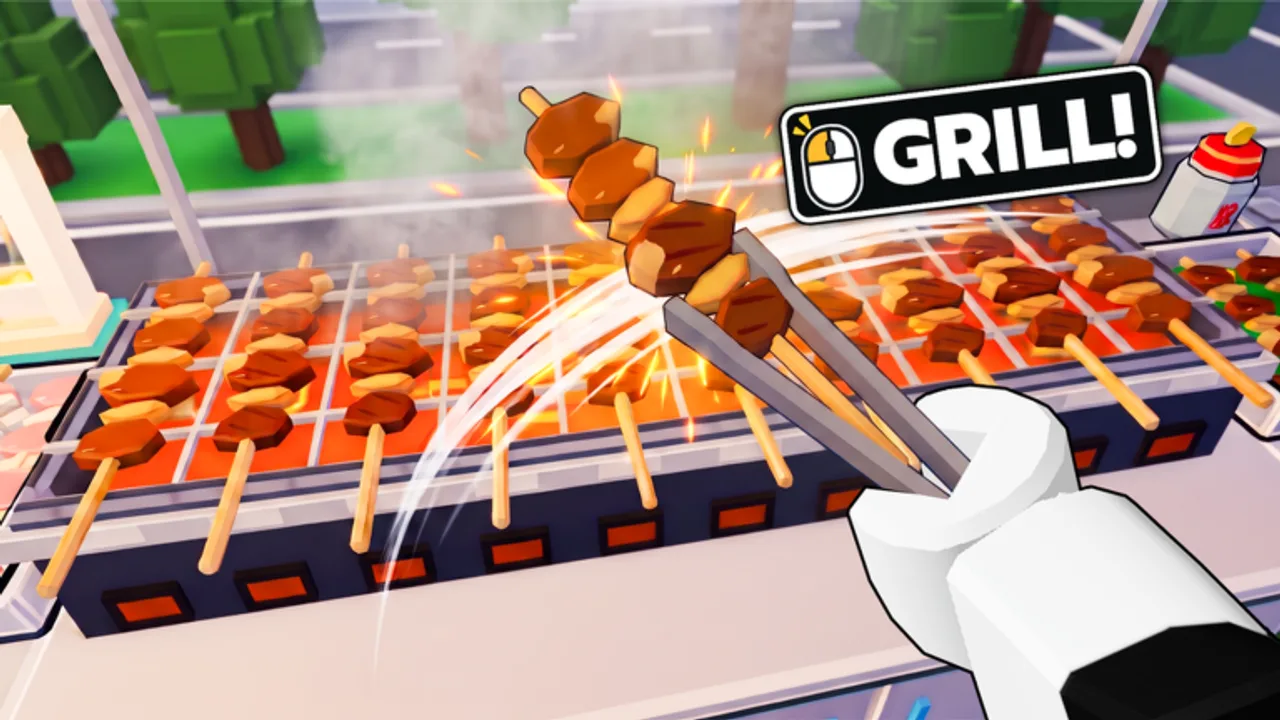
Knowing where every Sell Moo Ping button lives is free money. Seconds spent hunting Settings, missing a plate clear, or noticing a thief late add up across a session. This controls guide maps the practical HUD and action loop for Never Do Games’ Thai street-food tycoon so you can play faster without memorizing every Roblox default binding from scratch.
Pair this page with Getting Started for context and Fast Cash once the buttons feel automatic.
Launch and first UI pass
- Join from the official Roblox place.
- Let the stall UI finish loading before you sprint into menus.
- Locate Settings — this is where promo code redeem lives.
- Find mission / free gift entry points so you can claim them on a timer.
- Identify grill, sticky rice, serving, plate-clear, litter, and security interactions in your camera view.
If a patch rearranges icons — watch Updates after Update 1.0-style drops — re-walk this list before a serious grind.
Redeeming codes in Settings
The redeem flow is simple but easy to fumble under excitement:
- Open Settings from the in-game menu.
- Select the code / redeem field.
- Paste a code from the Codes Hub (
MEGA,BUGS,50LIKES,COOP,2xupdate,ZBINGZ, and any newer drops). - Press Redeem.
- Watch for cash changes, boost timers, or temporary guard indicators.
Tips:
2xupdateis case-sensitive.- Do not add spaces before or after codes.
- If redeem fails, rejoin once and verify you did not already claim it.
- Never enter passwords into random popups — see Scripts safety notes if something weird appears after using third-party tools.
Core stall actions
Grill controls
Interact with the grill station to place and manage moo ping skewers. Your job is uptime: keep cooking during customer demand and especially during 2x money windows. Camera angle matters — a bad view makes burn timing harder.
Sticky rice
Rice is part of complete service. Learn the interactable for rice prep and weave it into the grill cycle so tickets do not stall halfway.
Selling / counter service
Move finished product to customers efficiently. Waiter staff upgrades reduce how often you must personally babysit this step, but beginners should learn the manual serve interact first.
Clear plates
After customers finish, clear plates to unlock tip value and free space. Add this interact to every rotation even when you are focused on cooking.
Clean litter
Litter interacts keep the stall usable. In busy co-op lobbies, assign a cleaner so the griller never turns around to a trash maze.
Thief response / bonk / security
When thieves appear, prioritize them over perfect grill micro. Temporary Security Guard from MEGA teaches how valuable protection is; permanent security upgrades belong high on the tier list.
Money rain pickups
When money rain spawns, collect promptly. Movement cheats are unnecessary if you stay near the stall and react quickly.
Staff upgrade menus
Open staff UI to raise cook and waiter levels when cash allows. Confirm costs before clicking — auto-upgrade tools can dump baht poorly.
Missions and free gifts
Check these UIs at session borders. They are easy to forget and repeatedly worth the click.
Suggested control rhythm (solo)
- Claim missions/gifts.
- Redeem any new codes.
- Start or restock grill + rice.
- Serve available customers.
- Clear plates.
- Clean litter.
- Scan for thieves / money rain.
- Spend only on the next bottleneck.
- Repeat until the session ends or rebirth is ready.
This rhythm matches what automation hubs try to imitate with Auto Grill, Auto Sticky Rice, Auto Clear Plates, Auto Clean Litter, Auto Bonk, and Auto Claim toggles. Learning it manually makes you faster even if you never touch a script.
Co-op control split
In up to 8-player servers with shared earnings:
| Role | Primary interacts |
|---|---|
| Griller | Grill + rice |
| Runner | Serve + plates |
| Janitor | Litter + visual clutter |
| Security | Thief response |
| Flex | Money rain, missions, upgrade UI |
Call out when you open the upgrade menu so two players do not fight the same purchase.
Camera, movement, and QoL
- Keep the camera high enough to see thieves approaching.
- Stay close enough that plate and litter interacts remain instant.
- Use normal movement; WalkSpeed or JumpPower scripts are obvious and risky.
- If the game offers a home/stall teleport, use that instead of long runs during rushes.
Menu mistakes that cost baht
- Closing Settings before pressing Redeem.
- Activating 2x while reading Discord instead of grilling.
- Upgrading vanity from the stall shop during a rebirth push.
- Ignoring mission badges until they pile up.
- Fighting the camera instead of repositioning.
Accessibility and All Ages note
Around 11 November 2026 the experience messaging moved toward All Ages. Expect more brand-new players in public servers who do not know the HUD. If you are helping friends, walk them through Settings redeem and the plate/litter interacts early — it raises shared earnings for everyone.
Practice drill (10 minutes)
- Redeem a low-stakes code or simply open Settings twice to build muscle memory.
- Run five full cook → rice → serve → plates → litter loops without stopping.
- Intentionally watch for a thief spawn window.
- Open staff UI and calculate one planned upgrade without buying yet.
- Claim missions, then stop.
Complete that drill once and the rest of the wiki’s strategy advice becomes easier to execute.
Related pages
Controls mastery is quiet power. When every interact is instant, Sell Moo Ping stops feeling like a scavenger hunt and starts feeling like a kitchen you own.
Frequently Asked Questions
Quick answers to the most common Sell Moo Ping questions.
Where do I redeem Sell Moo Ping codes?
Open the in-game Settings menu, paste the code into the redeem field, and press Redeem.
What actions should I repeat every loop?
Grill, prepare sticky rice, serve, clear plates, clean litter, then scan for thieves and money rain.
How do I respond to thieves?
Interrupt your current task, use bonk/security responses immediately, and invest in guard coverage for longer sessions.
Why is sticky rice listed as a control priority?
Complete orders need rice as well as moo ping. Ignoring rice stalls customer flow even if the grill is busy.
Do updates change the controls?
Patches can move UI elements. Recheck Settings, missions, and stall interacts after major updates.